 Pektrix
Guide a shopper to checkout and route returns to your team
Try the two paths in the Ecommerce shopping template using a connected Shopify test store and a Modern widget.
On this page
Connect the shop and prepare the service reply
- Use a test workspace with Store integration and Workflows available. Open Commerce → Store integration, enter your store’s myshopify.com address, and use Continue to Shopify when available. Have the store owner approve the connection.
- Use Check connection and inspect the cart and checkout capabilities. If you used an authorized Storefront token instead, order updates require full Shopify authorization. Invoice links also require the store to supply them.
- Open Workflows → New workflow → Ecommerce shopping. Review the Returns help and Order or invoice help paths in Step outline. Edit the customer messages to match the store’s approved policies and keep the handoff for account-specific questions.
Exercise both branches in preview
- Save the draft, open Test and enter “I want to shop”. Choose Browse and shop and use Continue after shopping to check the message at the end of the shopping branch.
- Restart the test with “Help me with my order”, choose Returns help and inspect Preview trace for the handoff. The preview simulates the conversation without contacting Shopify.
Verify the visitor and operator experience
- Publish the workflow, activate it, and select Workflows in the widget v2 mode selector. Start a new Modern widget conversation in the test workspace. Choose Browse and shop, open the shop, select an available variant and review its quantity in the cart.
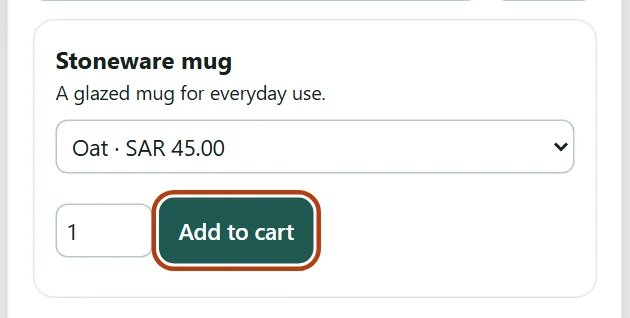
Select an available variant, enter the quantity and choose Add to cart. Look for the same variant in Your cart. - Continue to Shopify checkout and verify the product, variant and quantity at the store. You can stop at checkout when testing navigation. A completed order requires confirmation from Shopify.
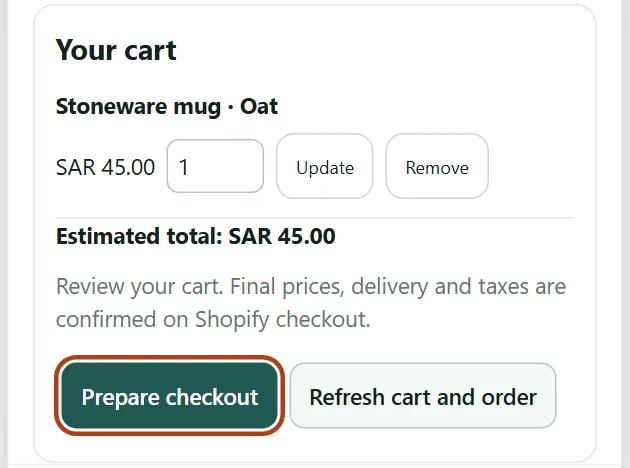
Check the variant and quantity, choose Prepare checkout, then follow Continue to secure checkout to verify the item at the store. - In a separate fresh conversation, use Returns help. Open Inbox and check that the request reached the team. The agent can review the order and the store’s return policy before offering a resolution.