 Pektrix
Connect Shopify and check the shopping journey
Let customers choose variants, manage their cart and continue to your store’s checkout.
On this page
Connect the right store
- Open Commerce → Store integration. Enter the store’s myshopify.com address without a protocol or page path. Choose Continue to Shopify and have the store owner approve access.
- For a store with an existing Headless integration, Advanced connection with a Storefront token supports products, carts and checkout. Match the Private Storefront token setting to the issued token and choose Verify and connect. Order updates require full Shopify authorization.
- After returning, look for Connected and check the listed capabilities. The Orders & invoices area shows whether order updates are available.
Verify the customer journey
- Choose Preview shopping to walk through a sample variant, cart and checkout. Use a test conversation to check your connected store’s actual products and variants.
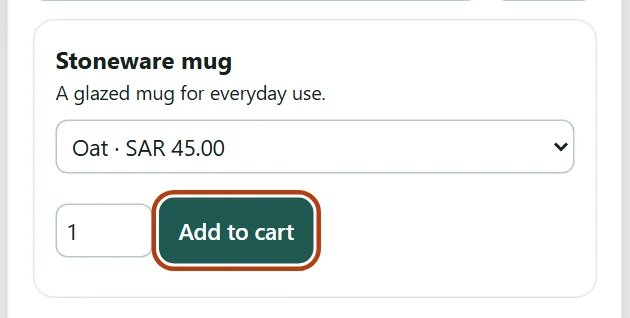
Select an available variant, enter the quantity and choose Add to cart. Look for the same variant in Your cart. - For invoice links served from a separate domain, open Invoice service settings, enter the exact approved domain and save. The store must supply the invoice link for each order.