 Pektrix
Set the assistant’s instructions and handoff guidance
Create a reusable instruction profile and activate it for the workspace.
On this page
Write a profile
- With permission to manage the bot, open Manage → AI instructions. On Instructions, choose New profile or select an existing one.
- Select an assistant type and response style. Describe its job in Assistant instructions. For example, ask a restaurant assistant to use the published menu for dish questions and offer staff assistance with allergy enquiries.
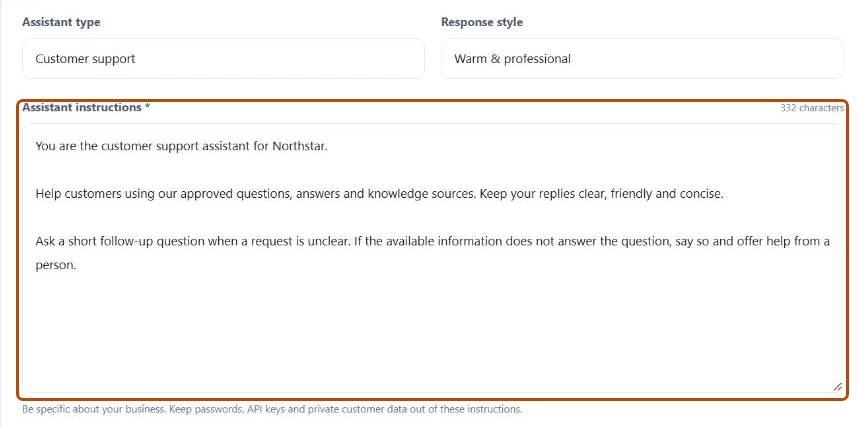
Choose the response style, then describe the assistant’s job and which approved sources it can use. - In Boundaries & handoff guidance, describe what the assistant should do when the answer is unknown. Add response preferences if needed, then choose Save instructions.
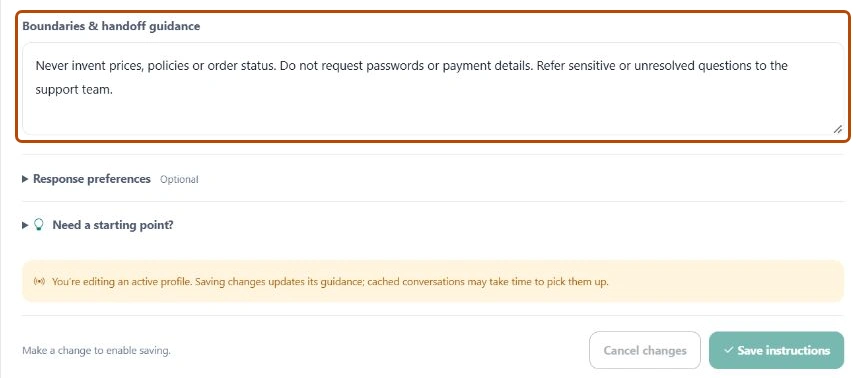
Write what the assistant should hand to a teammate, then choose Save instructions.
Activate and verify
- Select the saved profile and choose Activate profile. Check its Active badge. Saving changes to an already active profile updates its guidance.
- Use Answer sources to inspect the workspace knowledge. Test a question your sources cover and one that needs a handoff. Keep operational credentials and customer details out of instruction profiles.