 Pektrix
Choose an AI provider and a fallback
Set the model and destination for each supported language and test a saved provider route.
On this page
Save a provider profile
- As owner, open Manage → AI providers. Check the deployment-approved destinations. Where protected profiles are enabled, enter a name, provider type, approved address, model, output limit, prices and destination details. Enter any required key in its dedicated field.
- Choose Save protected profile. If the platform offers an inherited provider, review its destination and prices before creating the inherited profile.
- If protected settings are unavailable, check Manage → AI instructions → AI provider. In the existing settings you can use the platform default or create and activate a tenant configuration for Local Ollama or an external API.
Set the protected routes
- In Allowed generation routes, select a Primary for each required purpose and language. For a backup, save a second profile, select it as Fallback 1 and allow at least two provider attempts.
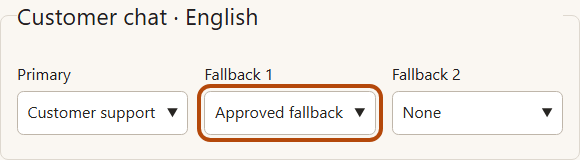
Choose your main profile under Primary and a different profile under Fallback 1. Allow at least two provider attempts to use the backup. - Set the deadline and token ceiling, enable Allow generation through these routes, then choose Save allowed routes. Saving a disabled policy stops generation on those routes.
- Run a saved question that needs AI in the matching language under Answer tests. Check its reported provider and model. If you edit a protected provider, select the updated version in the routes and save them again.