 Pektrix
Control AI spend and record marketing consent
Set workspace limits, record a conversion and keep consent records for marketing contacts.
On this page
Set AI limits and a fallback
- Open Audience → Growth & cost controls and check the selected business. In AI guardrails, choose Allow AI replies and set a monthly request, token or USD budget. A zero monthly limit means unlimited for that measure.
- Enter the input and output price per thousand tokens if tracking a budget. Write the reply visitors should see when AI is unavailable, then Save AI controls. Use the monthly totals at the top to review usage.
Record consent and conversions
- Under Marketing protection choose whether recorded opt-in is required and set the minimum hours between marketing messages. Select Save marketing controls. Opt-outs are always honoured.
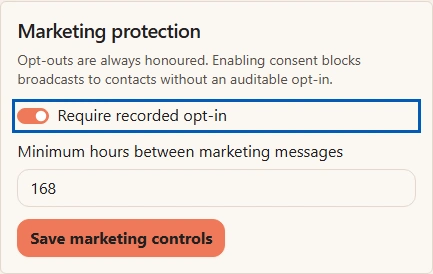
Turn on Require recorded opt-in to limit promotional broadcasts to contacts with a recorded opt-in. Enter the minimum interval in hours. - In Marketing consent choose the channel, enter the recipient’s external ID and opt-in or opt-out state, and record the source, such as a checkout checkbox. Save consent record and look for it in Recent consent records.
- For a confirmed sale or booking use Record a conversion. Enter the source, external event ID, event type and amount, then choose Record conversion. For example, reuse the same store name and order ID each time you report that purchase so it counts once.