 Pektrix
Connect Instagram and create a comment reply rule
Receive messages and match incoming comments to a public reply, a direct message or both.
On this page
Connect and verify the account
- Open Channels → Instagram. Enter the Instagram business account ID, linked Facebook page ID and access token from your Meta app. Enable Instagram and select the reply behaviours you need.
- Save changes and choose Test connection. Configure the displayed webhook callback in Meta with your administrator’s verification token. Send a test message and use Open inbox to confirm receipt.
Create a targeted reply rule
- Under Reply behaviour, turn on Automatic comment replies and save. In Reply rules choose Add rule. Name the rule, select Keyword and enter a word such as “catalog”. Under Reply destination, choose Public comment, Direct message or Comment and direct message.
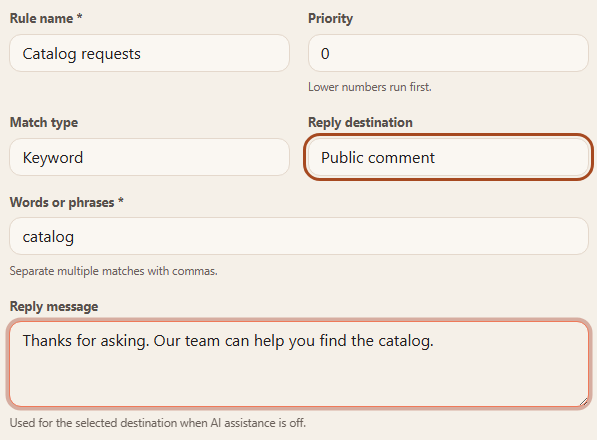
For this rule, a matching comment gets a public reply. Choose Direct message or Comment and direct message if the response belongs elsewhere. - Write the reply, select Rule active and choose Save rule. Lower priority numbers run first. For direct messages, enable Allow automatic direct messages in Reply behaviour as well.
- Post a matching test comment and check the selected reply destination. For an unexpected reply, review any higher-priority active rules that also match the comment.