 Pektrix
Set up product extraction for a website
Choose how Pektrix finds names, prices, images and other product details on store pages.
On this page
Choose a starting profile
- Open Commerce → Extraction profiles. In Quick Setup, choose the platform used by your store. If you are unsure, paste the public store page source in Auto-Detect Platform and select Detect Platform.
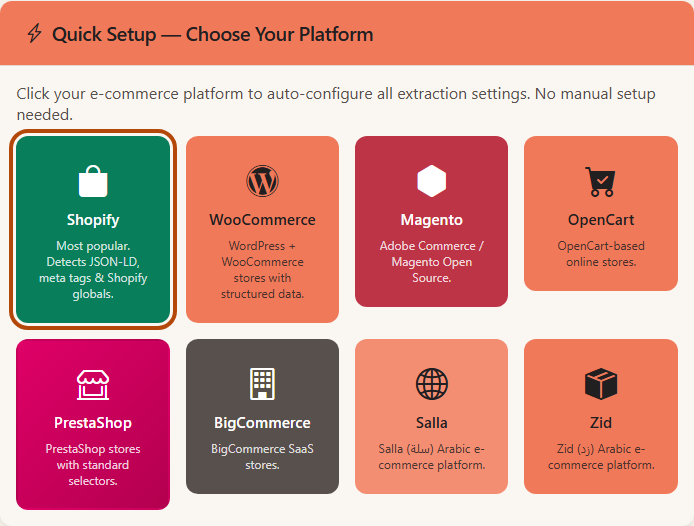
Choose the platform your store runs on to apply its preset. Use platform detection below the presets if you are unsure. - For a custom store, select Create Custom Profile, enter a profile name and default currency, then choose extraction methods that match the store, such as JSON-LD or OpenGraph.
- For a site with custom markup, use Show Advanced Selectors. Set the product container and the name, price or URL selectors. The editor distinguishes XPath for raw HTML from CSS for rendered pages.
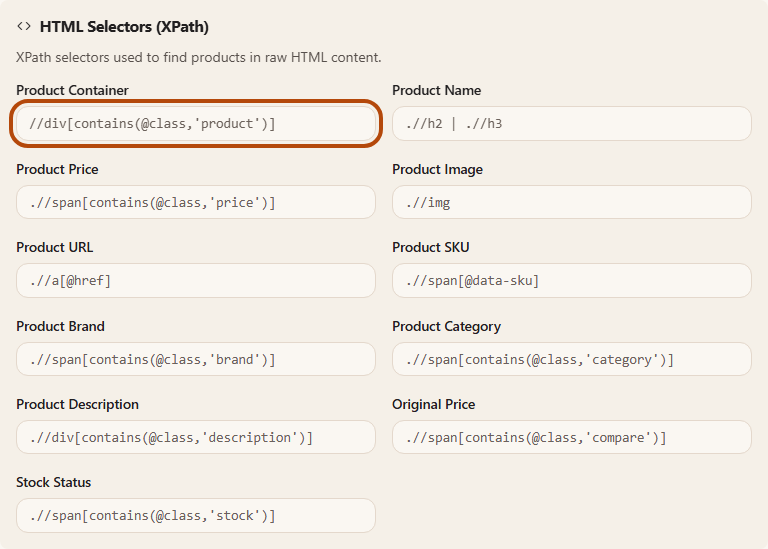
For raw HTML, enter an XPath expression that selects one product container. Check that its name and price both belong to that item.
Check the resulting catalogue
- Save the profile and use Set as Default on the intended profile where needed. Collect a representative product page in Knowledge → Website sources.
- Compare the resulting entry under Commerce → Products with the original page. Check a sale item or a product with unavailable stock before expanding collection to the whole store.