 Pektrix
Trace AI usage and budget reservations
Find the operation behind a provider attempt and distinguish completed usage from budget held for a pending result.
On this page
Read the monthly totals
- Open Insights → AI usage and choose Refresh usage. Detailed accounting must be enabled for this workspace’s deployment.
- Compare Accounted requests, Tokens and Priced usage (USD) with Current limits. Budget still held covers reservations for work whose outcome is pending or unconfirmed.
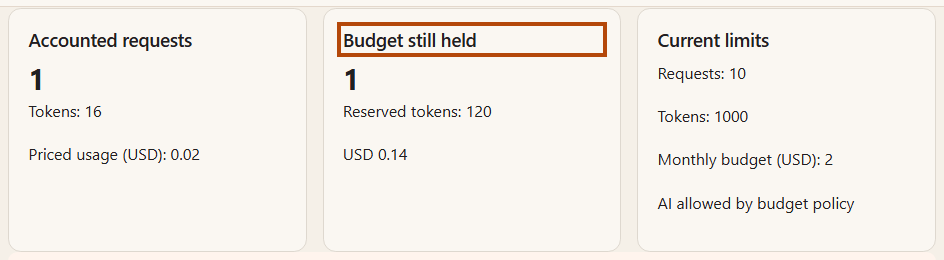
Compare held requests and reserved tokens with the accounted totals when reviewing the month’s usage.
Investigate an unexpected amount
- Under Provider attempts, compare the operation, provider-reported tokens, estimates and reserved tokens. Open Review conversation when available or choose Older attempts to inspect an earlier entry.
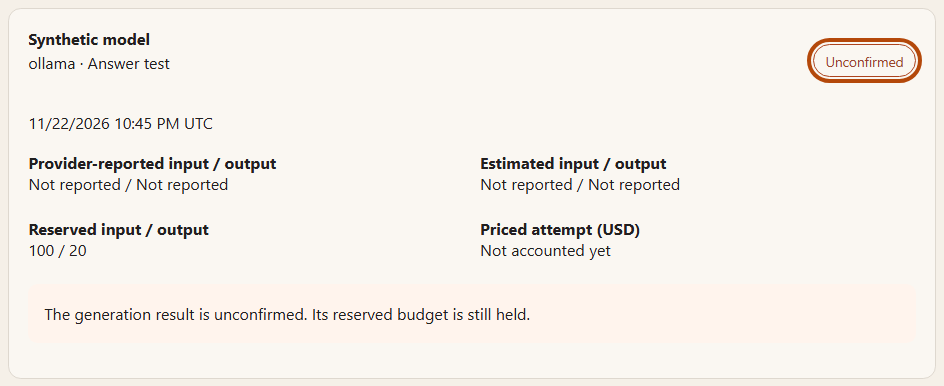
For an unconfirmed attempt, compare the reserved counts with the provider-reported counts. The reservation remains held while the outcome is unknown. - For website processing, choose Load parsing operations. Check whether a result was generated, withheld or denied by budget. Check the product or knowledge screen separately to confirm that the result was applied.
- Use Back to cost controls to review workspace limits. Displayed costs use configured token prices, so compare them with the provider’s invoice separately.