 Pektrix
Collect knowledge from your website
Start with one public page, check the text, then follow internal links within a chosen limit.
On this page
Collect a page or section
- Open Knowledge → Website sources and choose Add website pages. If your workspace uses reviewed knowledge, use Knowledge review for a manual revision or Knowledge connections for a reviewed website import.

Choose Add website pages to enter the public address you want to collect. - Choose One page and paste the full address of the page that contains the policy, such as the delivery page linked from your site's footer. Select Collect page. For several related pages, choose Website, set the starting URL, maximum depth and maximum pages, then select Collect website pages.
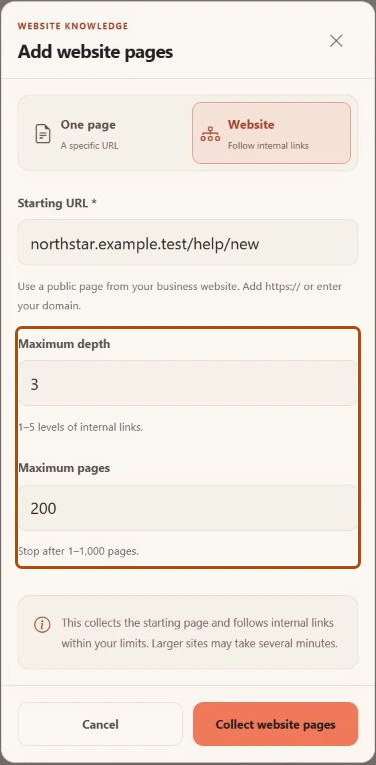
Set Maximum depth to limit how far links are followed and Maximum pages to cap the collection. - Start with a small section. Maximum depth controls the number of internal link levels. Maximum pages limits how much of the site is collected.
Verify and refresh a source
- Refresh the website page library, search for the URL, then select Review. Compare the extracted text with the visible policy or product details.
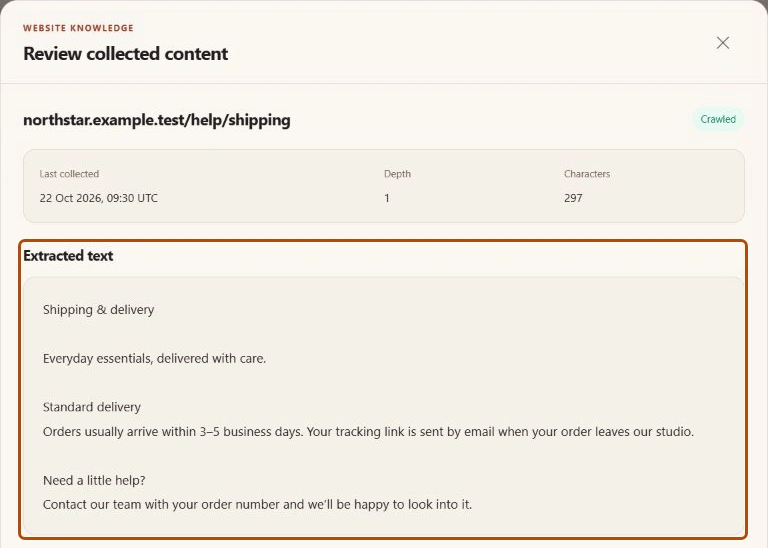
Find a sentence you recognize from the source page and check that its wording survived collection. - If the page changed or the saved text is empty, select Check page again. This checks one URL. To follow links again, start a Website collection.