 Pektrix
Assign conversations and route work
Give a teammate responsibility for a conversation or set rules to distribute incoming work.
On this page
Assign a conversation and leave context
- Open Inbox, select a conversation and open Details. In the assignment area, choose Assign to me to take ownership. With reviewed controls, select the decision, acknowledge the current assignment, review it and confirm. A manager can reassign someone else’s work.
- Under Private notes, write what the next person needs to know, such as a promised callback time. In reviewed controls, use Choose members to notify and save the note. Typing a teammate’s name alone does not send them an alert.
Set up automatic assignment
- For reviewed routing, the owner opens Operator workspace setup in Inbox, enables reviewed team controls and routing preferences, then reviews adoption readiness. On first adoption, review the backlog before choosing Adopt workspace.
- Open Routing rules and skills and choose Add a rule. For example, for Arabic support choose Arabic under Conversation language. Add an eligible member, set matching skills and Maximum open conversations, then move the rule above any broader match and choose Save routing rules.
- An operator can use My routing availability → Set available while their inbox is open and visible. Check the current renewal time and the assignment on an eligible conversation.
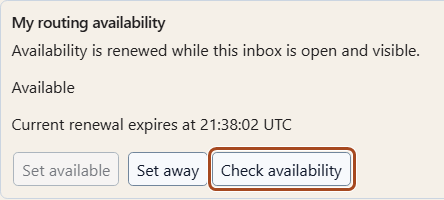
Use Check availability to confirm your current state and see when it needs to renew.