 Pektrix
Issue and verify a payment quote in a web conversation
Select a workspace's eligible gateways and send a visitor an exact quote to review before checkout.
On this page
Choose the workspace and gateways
- As a platform administrator, open Payment gateways and select the intended active workspace. Payment checkout requires payment settings to be enabled for the installation.
- Under Available gateways, check availability and test mode. Choose the gateways to enable, set First choice for eligible quotes, and select Save gateway choices.
Issue a quote and follow its status
- In Issue a payment quote, enter the web conversation ID from this workspace and a quote title in both English and Arabic. Check the currency, final amount, and minutes available to start checkout. For a USDC option, enter its separately approved amount.
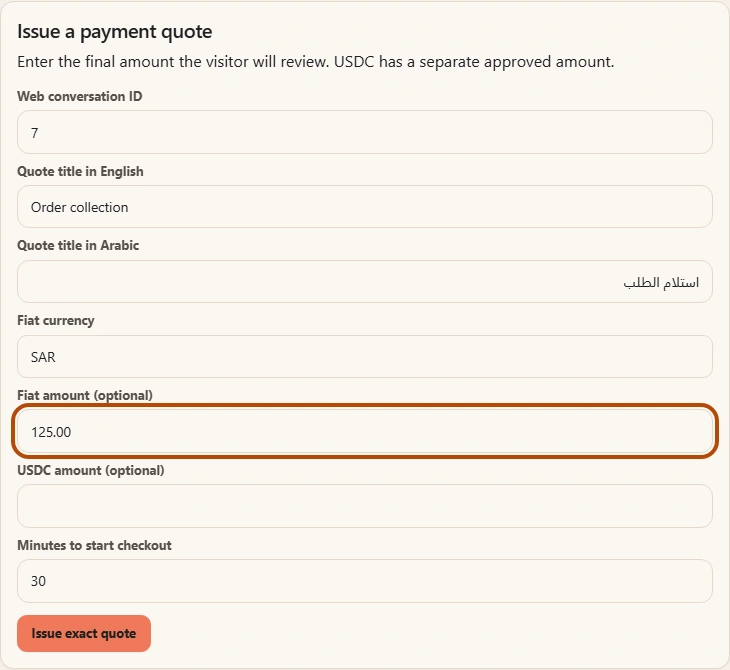
Check the conversation ID, both titles and the amount in the selected currency. Minutes to start checkout sets how long the visitor has to begin. - Choose Issue exact quote and find the entry in Recent payment requests. Use Open conversation to review the thread. The visitor must confirm the quote to start checkout.
- If issuance is unconfirmed, use Retry the same quote. To check a payment, use Verify with provider on the existing request and enter a provider reference if needed. For an outstanding quote you need to withdraw, review the revocation confirmation before choosing Revoke quote.